


Creating a website has usually involved a lot of nesting within the CSS code. For example, when we want to target a specific container within a specific parent container, and we have been writing the following for decades:
.myitem{
   font-color: black;
}

/*To overwrite the body color from black to red in the specific .myitem container*/
.parent_container .child_container .grandchild_container .myitem{
    font-color: red;
}
For decades, developers could only rely on CSS preprocessors like SASS, SCSS, or LESS for more structured and understandable code. However, since December 2023, most of the modern browsers are now support built-in CSS nesting capabilities.
Syntax
1. Nesting
HTML:
<body>
    <div class="myitem">Original</div>
    <div class="parent_container">
        <div class="child_container">
            <div class="grandchild_container">
                <div class="myitem">I want to override this text color</div>
            </div>
        </div>
    </div>
</body>
Example 1A: CSS (Old):
.myitem{
   font-color: black;
}
.parent_container .child_container .grandchild_container .myitem{
    font-color: red;
}
.parent_container .child_container .grandchild_container .myitem:hover{
    background: yellow;
}
Example 1B: New CSS Nesting:
.myitem{
   font-color: black;
}

.parent_container{
    .child_container{
     .grandchild_container{

       .myitem{
         font-color: red;

         &:hover{
             background: yellow;
         }

      }
    }
   }
}
Result (During Hover State):

Both will achieve the same results as shown above, but the code structure in 1B is more readable and structured compared to the one in 1A.
2. Reverse Nesting
In addition to nesting, another feature is for reverse nesting. For instance, The “&” nesting selector can also be appended to reverse the context of the rules.
HTML:
<!DOCTYPE html>
<html>
    <head>
        <link rel="stylesheet" href="style.css">
    </head>
    <body>
        <div class="myitem">Original</div>
        <div class="color1">
            <div class="myitem">
                I want to override this text color to red with yellow hover bg
            </div>
        </div>
        <div class="color2">
            <div class="myitem">
                I want to override this text color to green
            </div>
        </div>
    </body>
</html>
Example 2A: CSS (Old):
.myitem{
    color: black;
}
.color1 .myitem{
    color: red;
}
.color1 .myitem:hover{
    background: yellow;
}
.color1 .myitem{
    color: red;
}
Example 2B: New CSS Nesting:
.myitem{
    color: black;

    .color1 &{
        color: red;
        &:hover{
            background: yellow;
        }
    }
    .color2 &{
        color: green;
    }
}
Result (During Hover State):
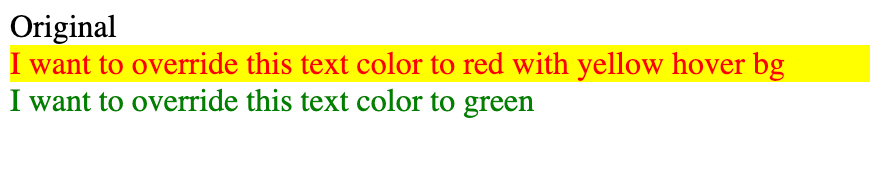
This key difference between native and CSS preprocessors is that:
- the native nesting CSS is directly interpreted and understood by browsers, without any additional process.
- the CSS generated by a preprocessor needs to be processed and compiled into standard CSS before browsers can interpret it.
Browser compatibility
 Important Note: As of today, this feature is almost fully supported on all modern and latest browsers. However, it may not work on older devices or browsers, and if your end users have not updated their browsers to the following versions, they may encounter issues with the CSS display.
 | | | | |  | | | | | |
|---|---|---|---|---|---|---|---|---|---|---|
| Chrome | Edge | Firefox | Safari | Opera | Chrome Android | WebView Android | iOS Safari | Firefox Android | Opera Android | Samsung Internet |
| 120 | 120 | 117 | 17.2 | 106 | 120 | 120 | 17.2 | 117 | 80 | 23 (Partial Support) |
Source: https://developer.mozilla.org/en-US/docs/Web/CSS/Nesting_selector#browser_compatibility
Happy Coding! 


 ui pencil
Leave a comment